You don’t need an app.Your guests don’t either.
Open the gate from your phone browser. Send a tap-to-open gate pass to your dinner guests before they arrive. Text a delivery link to the pizza driver — they tap it when they arrive and the gate opens. See who came and when, all on one screen.
- No app. Ever.
- One-time & long-term passes
- Tap-to-open delivery links
- Live activity feed
What residents actually use
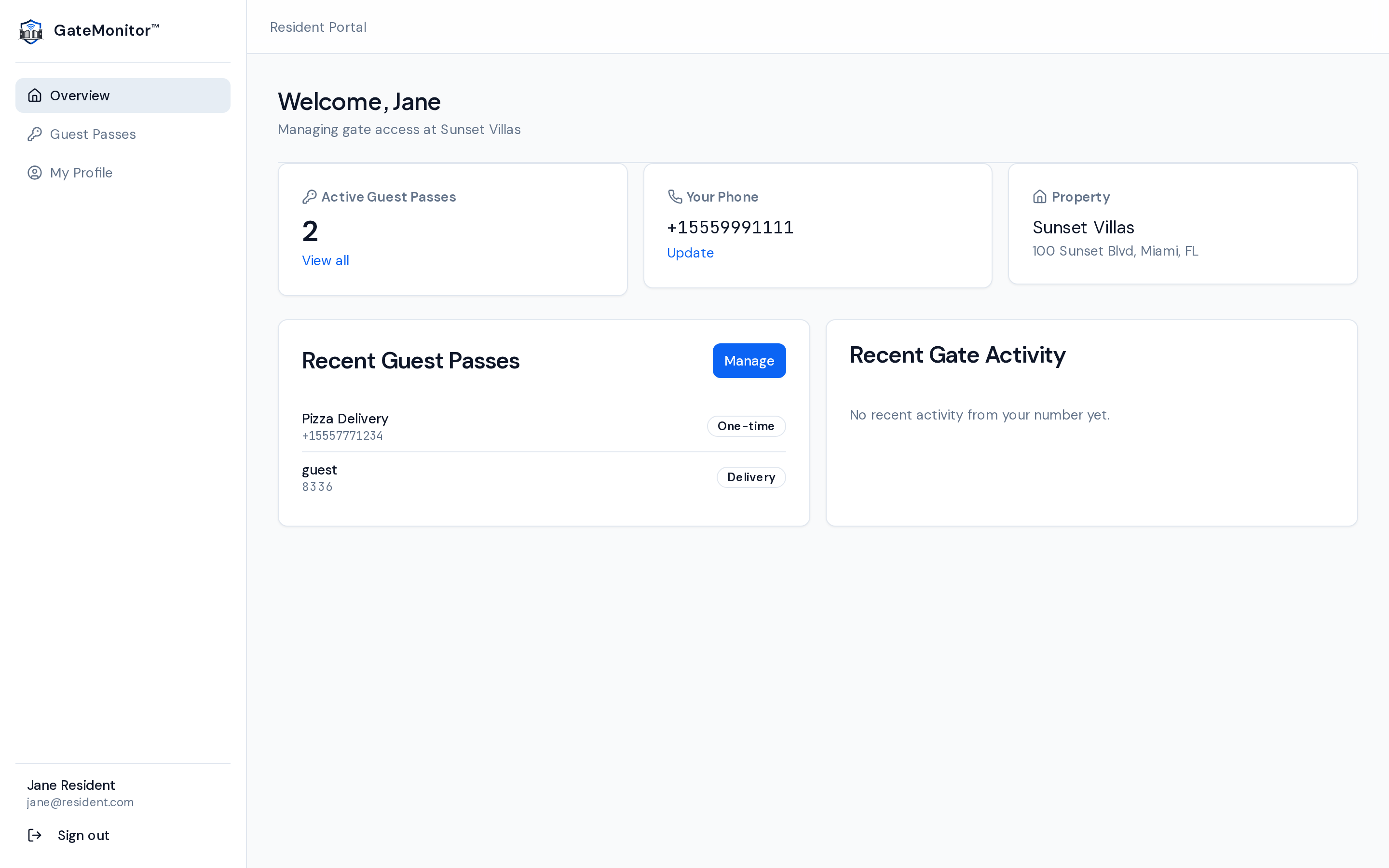
Not a mock. This is the resident portal you’ll use every week.
Real screens, real data patterns. Every button below does exactly what you think it does.
01 · Guest passes
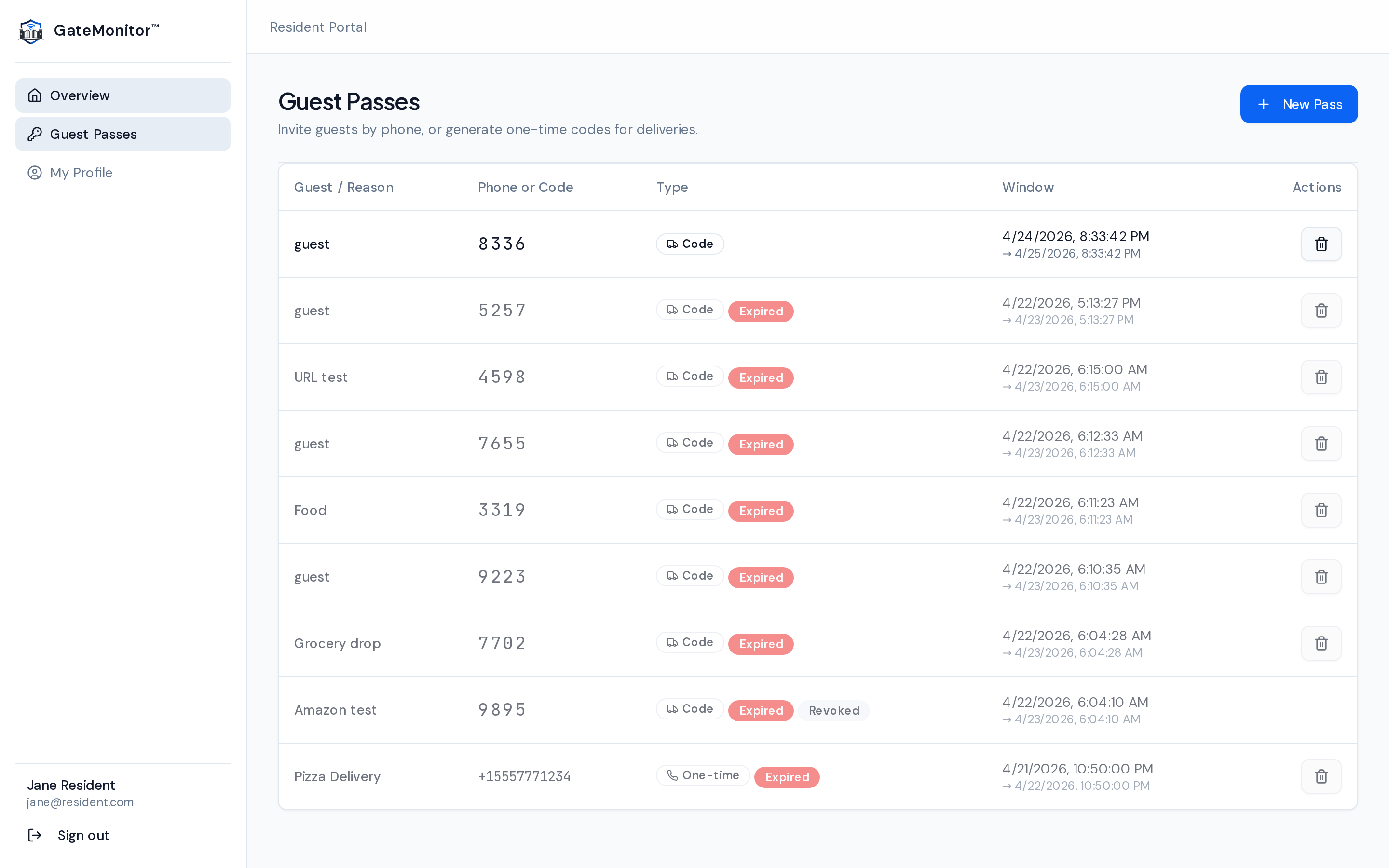
Every pass you’ve ever issued, on one page.
See everything you’ve given out — one-time passes, long-term passes, delivery codes. Know exactly when each one expires. Revoke any of them with a single tap if something changes.
- Filter by type, status, or validity window
- One-tap revoke — works instantly at every gate
- Auto-expire so you never forget about old passes
02 · Three ways to invite
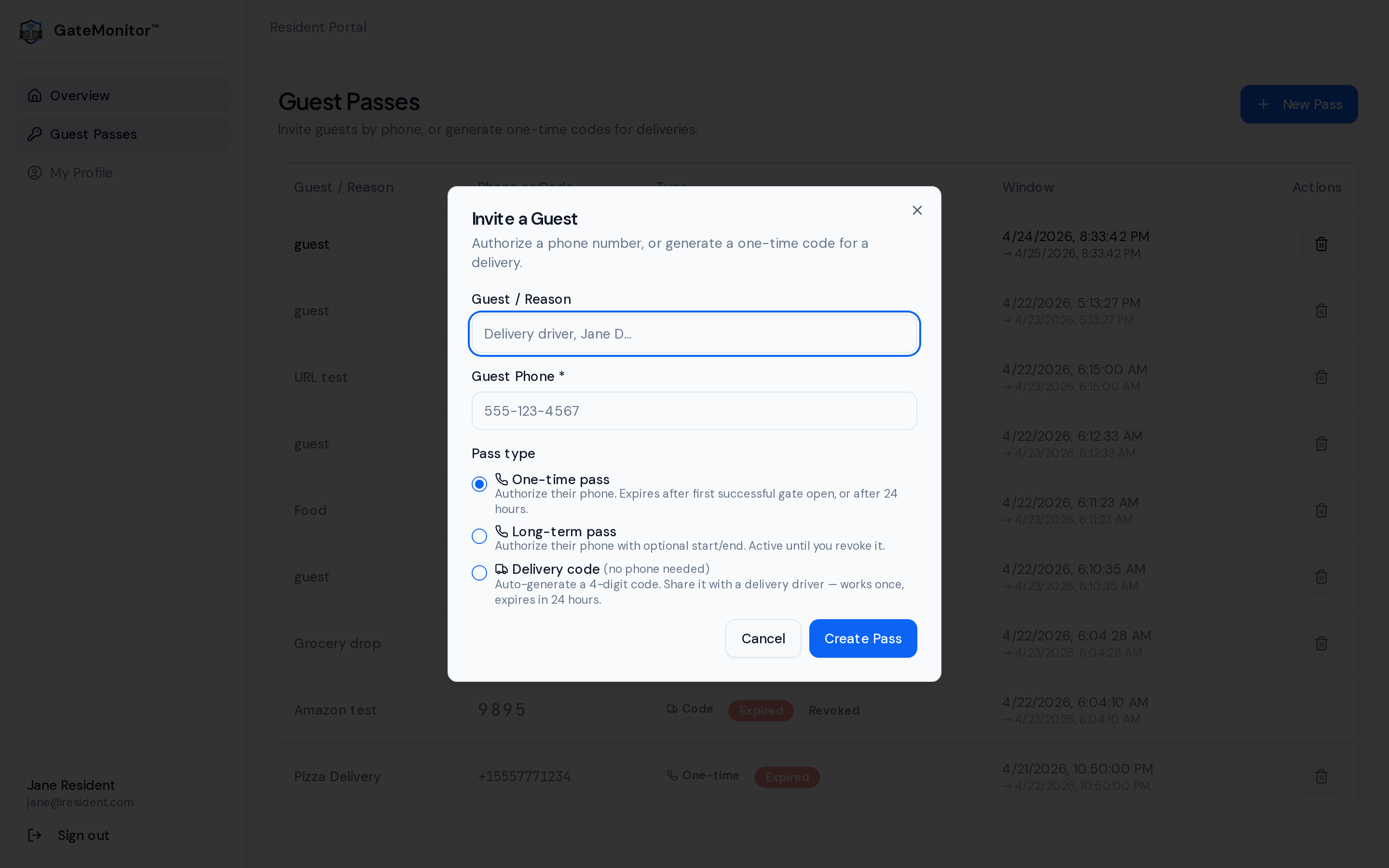
One modal. Every kind of guest.
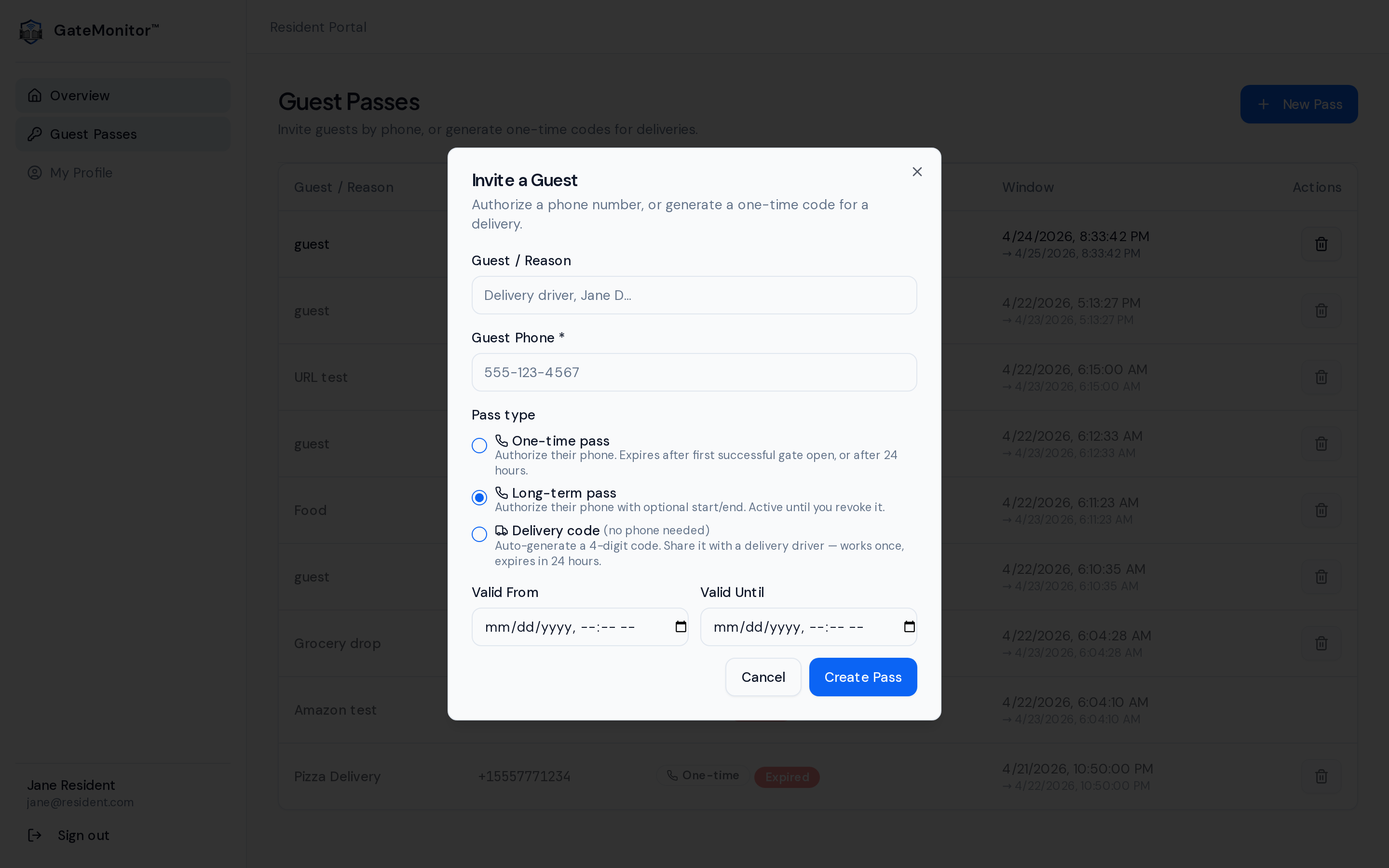
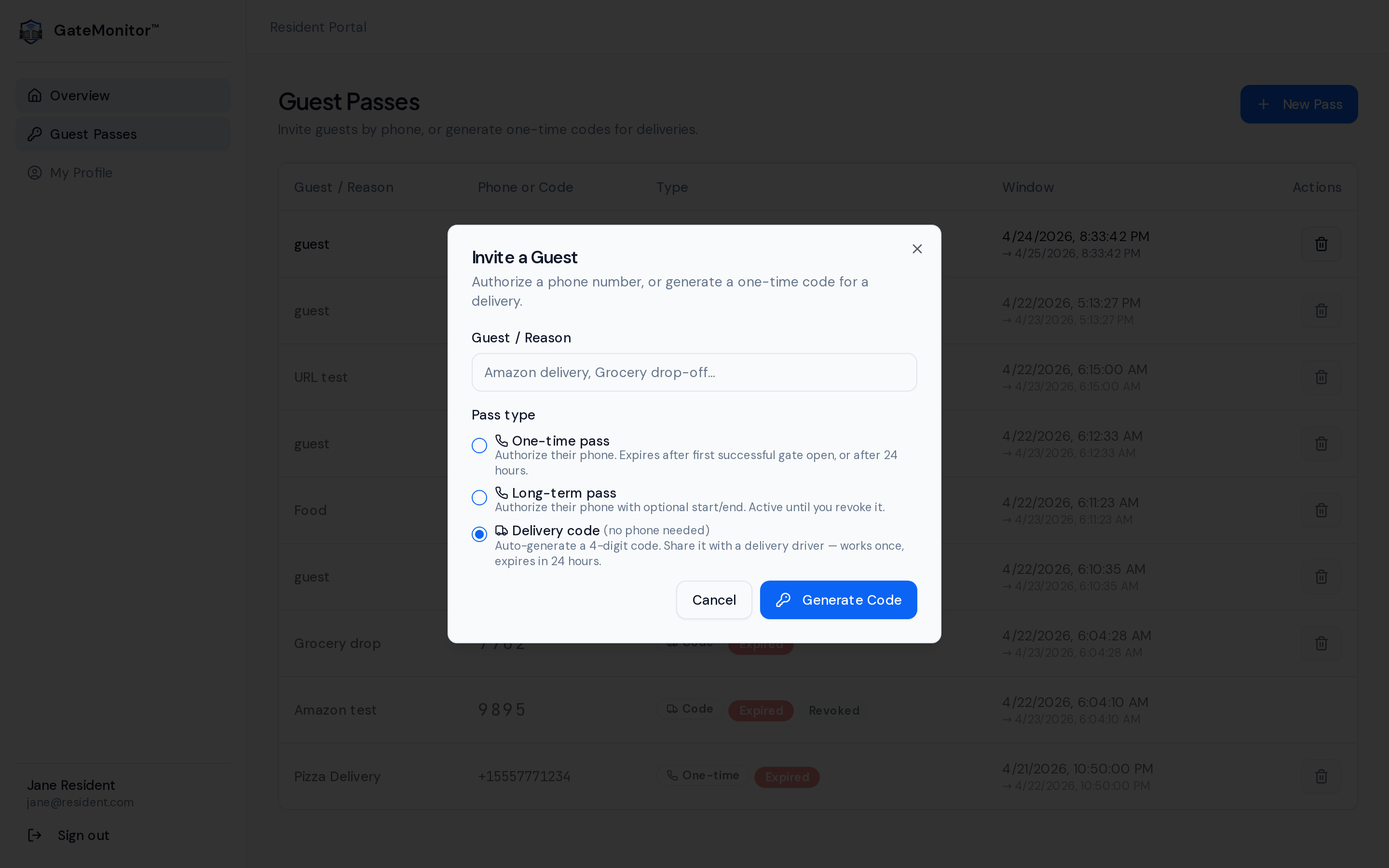
Pick the pass type that fits. The modal changes to match — phone number for authorized entry, date range for a long-term pass, or a 4-digit code for delivery drivers.
Option A
One-time pass
Authorize a phone number for one open. Perfect for a dinner guest — they drive up, the gate opens, the pass expires.
Option B
Long-term pass
Cleaner on Tuesdays? Mother-in-law for a month? Set a Valid From / Valid Until window. Revoke any time.
Option C
Delivery pass
No phone number needed. Generate a tap-to-open link with a backup PIN. Share the link in delivery notes — the driver taps it at the gate and presses Open. Works once, then auto-expires.
03 · Delivery codes that actually work
Copy once. Drop into your order notes.
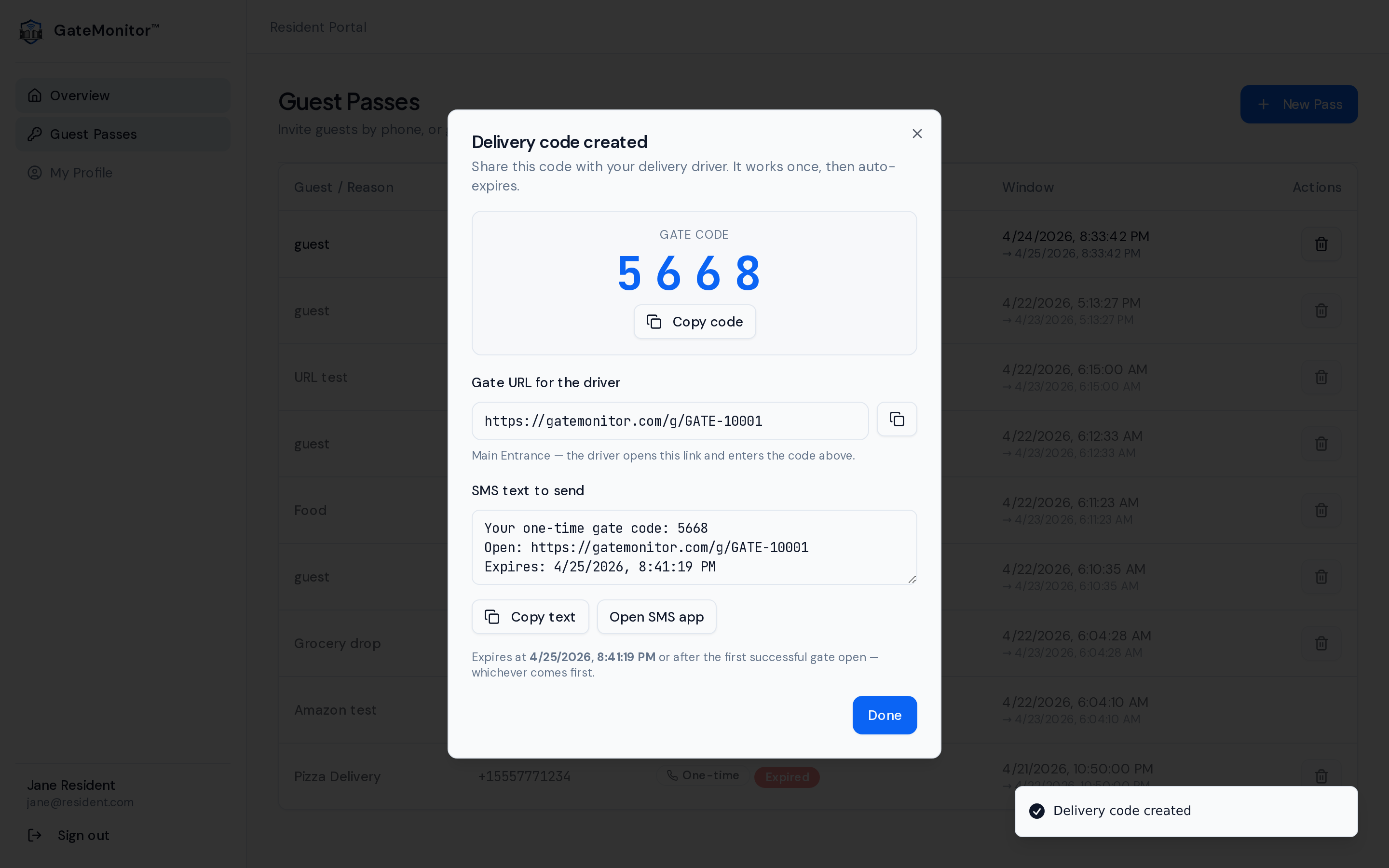
When you generate a delivery code, GateMonitor gives you the 4-digit code, the driver URL, and a pre-written SMS you can copy in one tap. One-line copy-paste into DoorDash, Amazon, or your contractor’s phone.
- Tap-to-open link with backup PIN
- Pre-written SMS with the link — paste straight into notes
- Works once, then auto-expires after 24 hours
Available add-on
Your plate is your key. Just drive in.
If your community adds license-plate recognition, registered vehicles open the gate automatically. No phone, no QR, no button — just pull up and go.
Register your vehicle
Add your plate number in the resident portal. Takes 10 seconds.
Drive up to the gate
Dual cameras read your plate from both directions. Day or night.
Gate opens. Done.
Matched plate → gate opens automatically. No phone needed.
Still works without LPR. Guest passes, delivery codes, QR scan, and PIN fallback all work exactly the same. LPR is a layer on top — it doesn’t replace anything.
Real life at a gated community
Five scenarios that happen every month.
Tap each tab to see what happens before and after GateMonitor.
A resident texts a guest an entry link
Before
Sarah calls the callbox 3x because her dinner guest can’t get the 4-digit code to read. Someone else in the community hears the frustrated shouting from the driveway.
With GateMonitor
- 1Sarah taps “Invite a guest” on her phone, picks the gate, and texts the link.
- 2The guest taps the link in their car. Scan to enter appears. Gate opens in ~4 seconds.
- 3Entry is logged automatically: Sarah’s name, guest name, gate, timestamp.
Outcome
No callbox call. No PIN to memorize. No shouting.
Each tab is a real operational scenario we see every week.
What changes for you
A gate that works the way your phone does.
No shared PIN
Every guest gets their own pass. No 4-digit code that the whole neighborhood knows.
Pre-approved guests
Send your mom a pass before she arrives. She drives straight through without calling you.
Delivery passes
Tap-to-open links that auto-expire after one use. Text to the driver or paste in order notes.
Live notifications
Get a buzz the moment anyone you invited arrives at the gate.
Long-term passes
Cleaners, babysitters, family visiting for a month — one pass, set the dates, revoke any time.
One-tap revoke
Cleaner quit? Ex moved out? Revoke their pass from this phone in under 3 seconds.
Activity feed
See every entry at your gate tied to your unit. Your own audit trail.
No app, ever
Works in the browser you already use. Your guests don’t install anything either.
Forward this to your HOA board.
We’ve written the email for you. It explains why the callbox is costing your community money, the 5-year savings estimate, and a link to the board-manager overview. One click, they read it in 90 seconds.
Opens your email app with a pre-filled subject and body. Feel free to edit before sending.
Quick questions
Stuff residents ask on day one.
No. Everything runs in your phone browser. Bookmark it, add it to your home screen if you want, but there is no app store involved.
You send them a gate pass link before they arrive. They tap the link when they get to the gate, see a branded pass on their phone, and press Open Gate — all from inside their car. No app, no callbox. If they don’t have the link, they scan the QR sign at the gate instead.
You generate a delivery pass from the resident portal. GateMonitor gives you a tap-to-open link and a pre-written SMS you can copy in one tap. Text it to the driver or paste it in your order notes. When the driver arrives, they tap the link, see the gate pass, and press Open Gate. Works once, then auto-expires.
No. Your phone number is used only to open the gate. Other residents never see it. Guests never see it unless you share it yourself.
Your authorized number still works from any phone that calls the gate. If you replace your SIM to a new number, your community manager updates it for you in 5 seconds.