Keep your gate.
Add a modern control layer.
GateMonitor is a hardware-friendly, independent overlay. Compatible with gate operators, mag locks, electric strikes, garage doors, and virtually any access point with a dry-contact relay. Keep what you have, or pick a $30 GateLink W1.
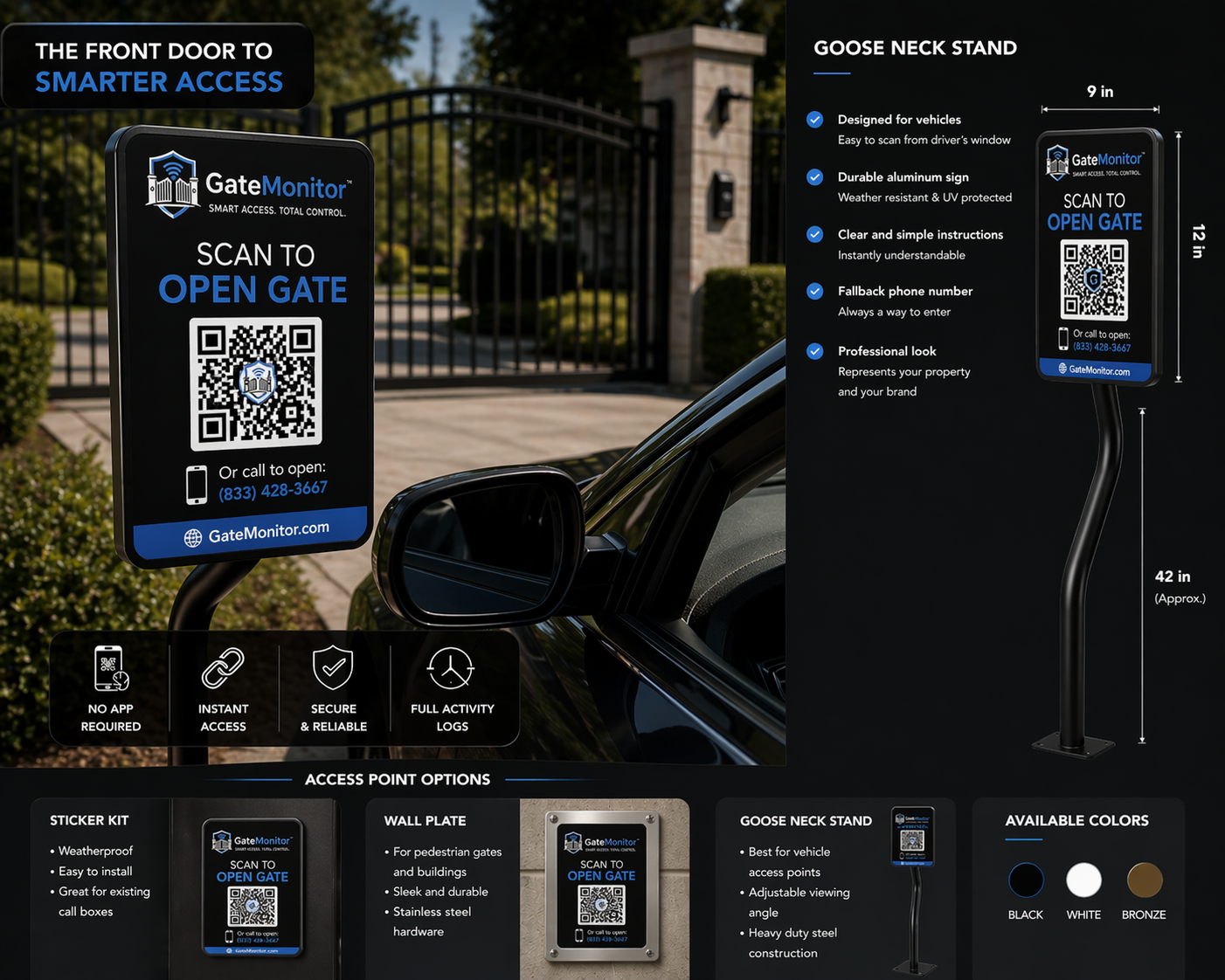
The overlay is a QR sign, not a new callbox
GateMonitor wires into the accessory input you already use. The visible surface is a weatherproof QR sign — a QR Entry Sign at drive gates, a QR Mini at pedestrian doors, or a QR Warning sign that replaces the required gate warning placard. Behind it sits a full phone-verified access control platform: the QR starts the request, verification controls the entry.
Most US gate operators sold in the last 20 years
GateMonitor speaks SMS to the receiver in your existing callbox or to a small Twilio relay. Your fobs, keypads, and telephone entry boxes keep working untouched.
Mighty Mule®
Compatible with Mighty Mule® residential swing and slide gate operators. GateMonitor triggers the same dry-contact relay your keypad or intercom already uses.
Confirmed models
- MM371/MM362 swing
- MM560/MM562 slide
- Smart Gate Opener (wired mode)
How it connects
Our relay board ties into the COM + NO terminals on the operator control board. When a resident or guest is approved in GateMonitor, we close the same loop the existing keypad does.
LiftMaster® / Chamberlain®
Compatible with LiftMaster® commercial gate operators that expose a standard dry-contact accessory input — including SL595, SL585, CSL24U, and CSW24U models.
Confirmed models
- SL595, SL585
- CSL24U, CSW24U
- Elite® Q223 (wired input)
How it connects
GateMonitor's relay controller wires into the LiftMaster® 'Open' accessory terminals. Your existing MyQ® or Internet Gateway stays in place for remote diagnostics.
All-O-Matic®
Compatible with All-O-Matic® commercial operators, a staple in gated HOAs across California and Arizona. GateMonitor taps the radio receiver input.
Confirmed models
- SL-100, SL-150
- OSCO OSC-900 (radio input)
- SW-200 swing
How it connects
Most All-O-Matic® installs already have a radio receiver wired to the 'RADIO' terminals. GateMonitor shares those terminals; your existing fobs keep working.
Linear® (Nortek®)
Compatible with Linear® AK-11 / AP-5 / AM3Plus / AE-500 receivers via dry-contact relay or RS-485 for supported models.
Confirmed models
- AK-11 standalone keypad
- AM3Plus telephone entry
- AE-500 receiver
- AP-5 multi-channel
How it connects
GateMonitor acts like one more 'radio' input on your Linear® receiver. Fobs, keypads, and telephone entry codes your residents already use keep working alongside GateMonitor.
USAutomatic®
Compatible with USAutomatic® Patriot, Sentry, and Ranger operators — popular for off-grid and solar installs. GateMonitor runs on the same 12V/24V low-voltage rail.
Confirmed models
- Patriot I/II/III
- Sentry 300/500
- Ranger HD
How it connects
Our low-power controller draws <150mA idle, so it works on solar installs without adding meaningful battery load. Wires into the Patriot/Sentry accessory input.
DoorKing® (DKS®)
Compatible with DoorKing® 1830/1833/1834/1835 telephone entry systems and 9000-series operators. GateMonitor sits alongside the DKS® callbox, not in place of it.
Confirmed models
- 1830/1833/1834/1835 telephone entry
- 9000/9050/9100 operators
- 6100 gate operator
How it connects
Residents keep dialing in through DoorKing® if they prefer. Guests can now scan the GateMonitor QR sign as a faster alternative to dialing every unit directly.
Apollo® Gate Operators
Compatible with Apollo® swing and slide operators — another solar-friendly option. GateMonitor ties into the same accessory terminal your fob receiver uses.
Confirmed models
- Apollo 1500 / 1600 / 1700
- Apollo 3500 / 3600
- Apollo 7000 slide
How it connects
Standard dry-contact relay on the accessory input. Existing Apollo® fobs and keypads keep functioning untouched.
KiaoTime® KT-G3
Compatible with KiaoTime® KT-G3 (and KT-G2) 4G cellular relay switches. GateMonitor manages the whitelist and triggers the gate via SMS — no app switching required.
Confirmed models
- KT-G3-A (AT&T / T-Mobile)
- KT-G3-V (Verizon)
- KT-G2 (legacy 3G)
How it connects
The KT-G3 recognizes authorized caller IDs and rejects the call to trigger the relay at zero cost. GateMonitor keeps the whitelist in sync automatically via SMS commands and can fire the relay remotely when a guest is approved.
Generic cellular callboxes
Got an older callbox from a brand we don't list? If it exposes a dry-contact relay, GateMonitor works. 95% of gate operators in the US do.
Confirmed models
- Any NO/COM dry-contact relay
- RS-485 integrations on request
- Wiegand bridge for card readers
How it connects
We install a small controller in the callbox pedestal. It listens for approvals from GateMonitor's cloud and pulses the same gate relay your existing fob receiver does.
Already have a WiFi relay or smart-home hub? Use it.
Every GateMonitor package includes a GateLink R1™ cellular router, but if you already have a WiFi relay or smart-home hub on-site you can use that instead — LAN/cloud HTTP or MQTT to fire the open command.
GateLink W1 — LAN
The GateLink W1 in LAN mode communicates directly with GateMonitor over your property’s WiFi network using a modern RPC API. Open the gate by calling Switch.Set or Cover.Open — no cloud account required.
Confirmed models
- GateLink W1 (current generation)
- GateLink W1 (cover mode)
- GateLink W1 Pro
How it connects
Wire the GateLink W1 relay across the gate operator’s accessory input (same terminals a fob receiver uses). GateMonitor calls the device API directly — no extra hub needed.
GateLink W1 — Cloud
The GateLink W1 in Cloud mode lets GateMonitor control the relay through a secure cloud connection — no tunnels, no port forwarding, no static IP needed.
Confirmed models
- GateLink W1 (all generations)
- GateLink W1 Pro
- Any cloud-enabled WiFi relay
How it connects
Enable cloud on the device, create a free cloud account, paste your Auth Key and Device ID into GateMonitor. Commands are relayed through the cloud to your device.
GateLink W1 — Legacy
Support for older GateLink W1 devices that use the legacy HTTP API. GateMonitor supports them out of the box — no firmware upgrade needed.
Confirmed models
- GateLink W1 Gen1
- GateLink W1 (legacy models)
How it connects
Same wiring as current models — across the operator accessory input. GateMonitor communicates via HTTP with auto-off after the configured pulse.
GateLink W1 — Custom Firmware
For advanced users running custom firmware on ESP-based relay boards. GateMonitor speaks to the device’s HTTP or MQTT API to fire a switch or button.
Confirmed models
- ESP32 relay boards
- Custom firmware devices
- DIY garage / gate relay builds
How it connects
Expose a switch or button on your device. GateMonitor calls the HTTP endpoint or publishes to the MQTT topic — the relay pulses for the configured time.
GateLink W1 — Smart Home Hub
If you already run a smart-home hub, point GateMonitor at its REST API or MQTT bus and call any switch / cover entity. Works with Z-Wave®, Zigbee®, Matter, and anything your hub controls.
Confirmed models
- Any smart-home hub with REST API
- switch.gate, cover.driveway_gate, etc.
- MQTT bridge to any hub entity
How it connects
Generate a Long-Lived Access Token in your hub. GateMonitor calls the switch/turn_on endpoint with entity_id, or publishes the matching MQTT topic.
GateLink E1 — Ethernet
For any MQTT-controllable relay. Configure a broker URL, publish topic, and payload — GateMonitor pushes the open command on every approved tap. Works with Mosquitto, EMQX®, HiveMQ®, AWS IoT, and Azure IoT Hub.
Confirmed models
- Mosquitto, EMQX®, HiveMQ®
- AWS IoT, Azure IoT Hub
- Any MQTT 3.1.1 / 5.0 broker
How it connects
GateMonitor connects to your broker (TLS supported), publishes the open command, and optionally subscribes to a status topic for closed-loop confirmation. You define topic + payload — we handle retries and idempotency.
Not just gates — any door or access point with a relay.
GateMonitor works with any access point that can be triggered by closing a dry-contact relay. That includes mag locks on apartment front doors, electric strikes on office entries, garage door openers, and more. Same QR sign, same phone-verified flow, same audit log.
Electromagnetic locks (mag locks)
Fail-safe locks commonly found on apartment front doors, lobby entries, and pool gates. When power is cut (or the relay fires), the lock releases — required by fire code for egress. Wire a GateLink W1 across the lock's relay input and the whole QR + phone-verified flow works identically to a gate.
Common use cases
- Apartment front doors
- Lobby & vestibule entries
- Pool gates & amenity doors
- Package rooms
Recommended: GateLink W1 or C1
Electric strikes
Fail-secure locks used on office doors, building entries, and utility rooms. The strike stays locked when power is off and releases when the relay fires. GateMonitor triggers the same relay your keypad or fob reader already uses.
Common use cases
- Office & co-working doors
- Building side entries
- Leasing offices
- Utility & storage rooms
Recommended: GateLink W1 or C1
Gate operators (swing, slide, barrier)
Every gate operator brand listed above — Mighty Mule®, LiftMaster®, DoorKing®, Apollo®, and more — exposes an accessory input (COM + NO dry contacts). GateMonitor ties into that same input. Your fobs, keypads, and telephone entry stay untouched.
Common use cases
- Swing & slide gates
- Barrier arms
- Vertical pivot gates
- Crash-rated barriers
Recommended: GateLink C1, W1, or E1
Garage door openers
Commercial and residential garage door openers with a relay input (virtually all of them) work the same way as a gate operator. Add per-resident allowlists, one-time passes for deliveries, and a full audit log.
Common use cases
- Resident parking garages
- Service bay doors
- Loading dock entries
- Individual storage garages
Recommended: GateLink W1 or C1
Any dry-contact relay
If it can be triggered by closing a NO/COM dry-contact circuit, GateMonitor can drive it. This covers the vast majority of commercial and residential access hardware sold in the US — locks, operators, doors, turnstiles, and more.
Common use cases
- Turnstiles
- Pedestrian gates
- Handicap-accessible openers
- Custom integrations
Recommended: GateLink C1, W1, or E1
⚠️ Door hardware (mag locks, electric strikes) has fire-code wiring nuances — we always recommend a licensed locksmith or electrician for the physical install. Once the relay is in place, the rest is software.
Bridge the gap — no trenching required.
When the gate is too far from the building for WiFi or Ethernet, a wireless bridge carries the dry-contact signal across the property without running conduit.
Sure-Fi® Relay Wireless Bridge
Replaces the wire run between the building and the gate. Place a GateLink W1 or E1 indoors (where internet is available) and wire it to Sure-Fi Unit A. Mount Sure-Fi Unit B at the gate, wired to the operator's dry-contact input. The Sure-Fi bridge carries the relay closure wirelessly — up to 1 mile through walls or 50+ miles line-of-sight.
When to use it
- Gate is 200+ feet from the nearest network drop
- Trenching conduit is too expensive or impractical
- WiFi signal doesn’t reach the gate pedestal
- Solar-powered gate with no wired path back to the building
How it works with GateMonitor
Sure-Fi is invisible to GateMonitor — it acts as a wireless wire. GateMonitor sends the open command to your GateLink relay indoors; the GateLink closes the relay; Sure-Fi bridges that closure to the gate operator wirelessly. No software integration needed — it's a drop-in hardware layer.
Specs at a glance
- 900 MHz frequency-hopping, AES-128 encrypted
- 1 mile through obstructions / 50+ miles line-of-sight
- 2 Form C relays per unit (NO, NC, COM)
- 12 VDC with built-in UPS battery charger
- DIN rail or wall mount
Pairs with: GateLink W1 or E1
sure-fi.com →💡 Sure-Fi® is a third-party product and is not included with GateMonitor kits. Ask your integrator or order directly from sure-fi.com. GateMonitor is not affiliated with or endorsed by Sure-Fi LLC.
Trademark notice. Brand names appear on this page solely to describe gate-operator and relay compatibility. All product and company names are trademarks™ or registered® trademarks of their respective holders. Use of these names does not imply any affiliation with, partnership with, certification by, or endorsement by their owners. GateMonitor is an independent product of Gate Monitor, LLC and is not affiliated with any of the third-party brands referenced.
SOC 2 Type II
Audit in progress. We’ll share the report the day it lands.
99.95% uptime SLA
On Enterprise plans. Managed from the relay, not the callbox.
Export your data anytime
CSV of every event, every user, every gate. You own it.
7-year log retention
Meets most HOA insurance and audit policies.
Role-scoped access
Residents, managers, and admins only see what they need to.
Not sure if your hardware is compatible?
Send us a photo of your gate operator, door lock, or control board. We'll confirm compatibility and recommend the right GateLink model and installation path within one business day.
Integrations FAQ
The tactical answers installers and boards ask.
No. GateMonitor sits alongside what you already own. Your fobs, keypads, and telephone entry boxes keep working; residents and guests just gain a faster, phone-verified path that's QR-initiated and audit-logged.
If your gate operator has a dry-contact relay (virtually all of them do), GateMonitor works. Send a photo of your control board to [email protected] and we'll confirm in 24 hours.
Only if you want GateMonitor to read existing HID / Wiegand cards. Most HOAs start without it and use the phone-verified flow plus one-time codes — no extra hardware.
Option A: your current gate service tech spends 60–90 minutes at the pedestal (we send a one-page wiring diagram). Option B: we ship a certified installer; boards pay a flat travel fee. Option C: boards with a handy volunteer can DIY — we support this on video.
No. GateMonitor is a passive relay trigger on the accessory input — same class of device as a fob receiver. This is the standard integration point documented by every operator manufacturer above.
Yes. If the door has a mag lock or electric strike with a relay input, GateMonitor drives it the same way it drives a gate operator. Wire a GateLink W1 across the lock relay, apply a QR sign, and the full phone-verified flow works. We recommend a licensed locksmith for the wiring — mag locks are fail-safe (fire code), electric strikes are fail-secure.
Anything triggered by a dry-contact relay: electromagnetic locks (mag locks), electric strikes, gate operators, garage door openers, turnstiles, pedestrian gates, and more. The common requirement is a NO/COM dry-contact input. If your access point has one, GateMonitor works.
Your access point is probably already compatible
Book a 15-minute call. We'll confirm compatibility live, and send a one-page PDF your board can use.